If you’ve ever spawned into a new Minecraft survival world 10 minutes before dusk, sprinting to chop enough oak wood to throw together a basic shelter before creepers start hissing at your heels, you know exactly how high a functional entry is on your priority list. You don’t want to spend your first night cowering in a dirt hole with no way out, or worse, wake up to a zombie standing in your crafting area because you forgot to block the entrance. That’s why learning how to make a door in Minecraft PC is one of the first core skills every new player picks up, even before they craft their first iron pickaxe or build a proper bed. It’s not just a functional block, either: doors are one of the easiest ways to add personality to your build, whether you’re going for a cozy cottage, a menacing nether fortress, or a high-tech redstone base.
How to Make a Door in Minecraft PC: Basic Crafting Steps
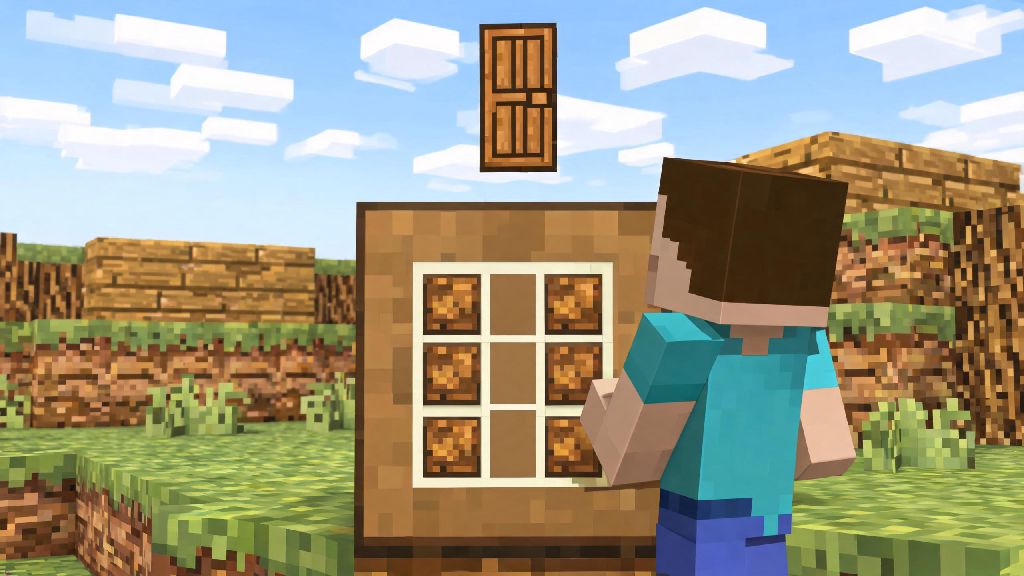
The standard crafting recipe for a wooden door is dead simple, and you can pull it off within minutes of spawning into a new world. All you need is 6 planks of the same wood type, and access to a 3x3 crafting table. If you want an iron door instead, swap the planks for 6 iron ingots, which you’ll get by smelting iron ore in a furnace. Wooden doors can be opened by right clicking, villagers, or even zombie raids on hard mode, so keep that in mind if you’re building a base in an area with frequent villager traffic. To craft, open your crafting table interface, place 3 planks in the leftmost column of the grid, and 3 planks in the middle column, leaving the rightmost column completely empty. You’ll get 3 wooden doors from this recipe, which is enough for a double door entry plus a spare for a side storage room. On PC, you can shift click the output slot to pull all 3 doors directly into your inventory without dragging, which saves time when you’re cranking out building supplies mid-survival run. If you’ve followed the standard steps for how to make a door in Minecraft PC but it’s not showing up in your crafting output, double check that you’re using 6 of the same material, not a mix of different wood planks — mixed planks won’t work for the base recipe.
Key Differences Between Door Types for Minecraft PC Builds
Not all doors are created equal, and picking the right one for your build can save you a lot of headache down the line. Wooden doors come in 9 different wood variants as of the latest update, including cherry, mangrove, and bamboo, so you can easily match your door to the rest of your build’s color palette. They’re cheap, easy to craft, and don’t require any extra redstone components to use, which makes them perfect for early-game builds. Iron doors are 100% mob-proof, even on hard difficulty, so they’re the best pick for late-game survival bases that see a lot of raid or monster activity. The only catch is that iron doors won’t open with a simple right click — you’ll need to pair them with a redstone input like a button, lever, pressure plate, or even a tripwire. A lot of new players mess up double door placement, so here’s a quick tip: always place both doors while standing outside of your structure, facing inward. That way, they’ll open outward when you interact with them, and they’ll line up perfectly without any weird gaps. If you place them from the inside, they’ll open inward, which can feel cramped in smaller builds, and they might not sync up properly if you’re using redstone inputs for automatic opening. If you’re building a village raid farm, you’ll want to use wooden doors since villagers recognize them as valid home entries, which is a core part of how villages spawn in the game — just make sure you follow the standard steps for how to make a door in Minecraft PC so the game registers it correctly.
Fun Custom Door Variations to Try After You Master the Basics
Once you’ve got the basic door recipe down, you can get really creative with custom entries that fit your play style and build aesthetic. You don’t need fancy redstone skills to make most of these, either — most take 5 minutes or less to put together, even for new players. Here are a few of my go-to custom door ideas I use in almost every playthrough:
Common Door Troubleshooting Fixes for Minecraft PC
Even if you follow the recipe exactly, you might run into small issues with your doors, especially if you’re playing on a multiplayer server or using mods. One of the most common issues new players run into is an iron door that won’t open. If that happens, first check that your redstone input is actually connected to the door or the block it’s attached to — floating buttons or levers that aren’t touching a solid block won’t send a signal. If you’re playing on a multiplayer server, you might not have permission to interact with blocks in that area, so check with the server admin if you’re building in a shared spawn or community area. Another common complaint is zombies breaking down wooden doors. That only happens on hard difficulty, so if you don’t want to switch to a lower difficulty, swap your wooden door for an iron one, or place a block in front of the door at night to block zombie access. If you’re playing with modded content, some custom doors might have different crafting recipes than the vanilla base game. On PC, you can press F3 + H to enable advanced item tooltips, which will show you the exact crafting recipe for any modded door if you’re stuck. Always back up your world before installing modded door packs, as some incompatible packs can corrupt existing door blocks in your build. If you’re playing on a version older than 1.20, you might notice slight differences in how bamboo doors craft, but the core steps for how to make a door in Minecraft PC stay the same across all recent updates.
At the end of the day, even the fanciest Minecraft base is useless if you don’t have a functional entry to keep mobs out and make coming home feel welcoming. Once you know how to make a door in Minecraft PC, you can tweak it to fit any build, from a tiny dirt survival hut to a massive custom castle that spans thousands of blocks. I still get giddy trying out new hidden door designs for my secret storage rooms, and I still default to a basic oak door for my first night shelter every time I start a new world. Don’t be afraid to experiment with different materials and designs — there’s no wrong way to make a door that works for your play style, whether you prioritize function, aesthetic, or a little bit of both.