If you’ve ever wanted to build hidden doors, automatic farms, or moving structures in your Minecraft PC world, you’ve probably run into a point where you need a functional piston. Learning how to make a piston in Minecraft PC is one of the most foundational skills for anyone looking to go beyond basic block builds, whether you’re playing survival mode with limited resources or messing around in creative with unlimited supplies. I’ve built hundreds of piston-powered contraptions over the years, from simple crop harvesters to fully hidden base entrances, and I’ve broken down the process below to be as straightforward as possible, even if you’ve never crafted a redstone component before.
Exact Materials You Need to Make a Piston in Minecraft PC
Before you even open your crafting table, you’ll want to make sure you have all required materials on hand to avoid running back and forth across your world. The good news is that none of these materials are particularly rare, even if you’re only a few days into a new survival world. Let’s break down what you need and how to source each item easily:
If you’re playing in creative mode, you don’t need to gather any of these materials, of course. You can find pistons in the “Redstone” tab of your creative inventory, or search for “piston” in the search bar to pull it up instantly. That said, it’s still useful to know the crafting recipe if you ever switch back to survival mode or want to teach friends who play on survival servers.
Step-by-Step Piston Crafting Process for Minecraft PC
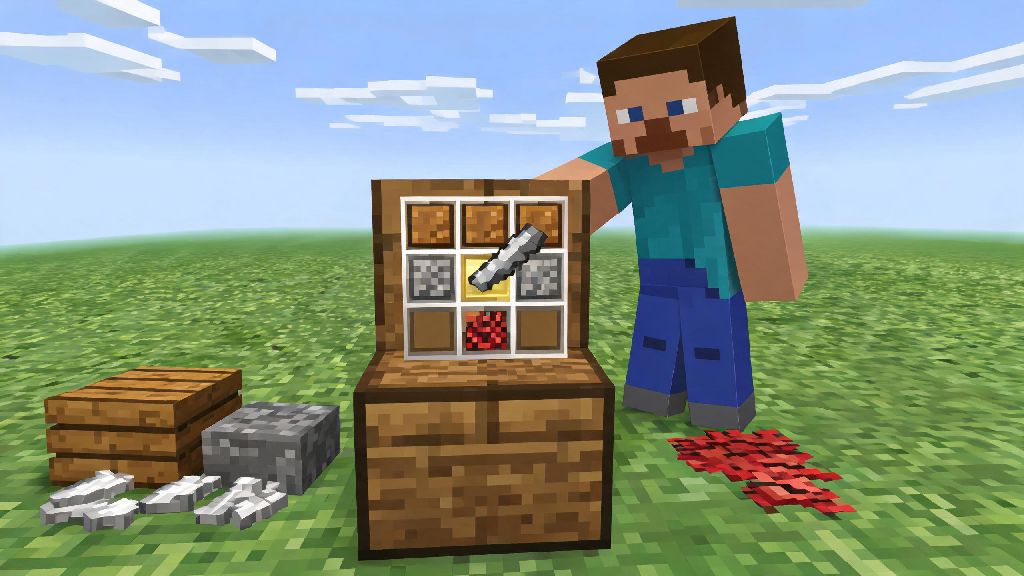
First, you can only craft pistons using a 3x3 crafting table, not your personal 2x2 inventory grid. That’s one of the most common mistakes new players make, so make sure you’ve built and placed a crafting table near you before you start. Open the crafting table interface to access the 3x3 grid, then follow this exact layout to get your piston.
Fill the entire top row of the grid with your three wood planks, one in each top slot. For the middle row, place a cobblestone block in the left slot, your iron ingot in the center slot, and another cobblestone in the right slot. For the bottom row, place a cobblestone block in the left slot, your redstone dust in the center slot directly below the iron ingot, and another cobblestone in the right slot. If you placed every item correctly, a piston will appear in the result slot to the right of the grid. Click it to move it to your inventory, and you’re done.
I can’t tell you how many times I’ve mixed up the redstone and iron ingot slots when I’m in a hurry to build a hidden door, so double check that layout if you’re not getting the piston result. If you want to make a sticky piston instead of a regular piston, you just need to combine your finished piston with a slime ball in the crafting grid. Sticky pistons pull blocks back with them when they retract, which is useful for things like hidden doors or automatic item sorters, while regular pistons only push blocks forward.
Common Mistakes to Avoid When Using Your New Piston
Making your piston is only half the battle, right? If you’ve never used one before, it’s easy to run into small issues that make your contraptions not work as expected. Let’s cover the most common mistakes I see new players make, so you can skip the frustration of troubleshooting for hours.
Pistons can only push up to 12 blocks at a time, so don’t try to move a 20-block wall with a single piston, it just won’t work. If you need to move more blocks, you’ll have to set up multiple pistons in a sequence. You also can’t push blocks that are attached to other blocks, like torches or levers, unless you push the base block they’re attached to first. Pistons can’t push obsidian, bedrock, end portal frames, or blocks with inventory like chests or furnaces, no matter how much power you send to them. If you’re trying to move a storage system, you’ll need to empty the chests first or use a mod that adds movable inventory blocks.
Pistons need a redstone power source to activate. That can be a lever, button, pressure plate, redstone torch, or even a tripwire. If your piston isn’t moving, first check that it’s connected to an active power source, and that there are no gaps in your redstone line. I once spent 45 minutes troubleshooting a piston crop farm that wouldn’t activate, only to realize I’d forgotten to flip the lever that powered the whole system. Don’t be like me, do a quick power check before you start rearranging all your blocks.
Practical Use Cases for Pistons in Your Minecraft PC World
Now that you know how to make and use a piston, you might be wondering what to build with it first. There are thousands of contraptions you can make, but these are some of the most useful builds for new players to try, no matter what mode you play in. For survival players, the most useful first build is an automatic crop farm. You can set up a row of pistons above a wheat, carrot, or potato farm, connected to a lever. When your crops are fully grown, flip the lever to push the pistons down and break all the crops at once, so you don’t have to break each one by hand. This cuts down harvesting time by 90% and makes it way easier to stock up on food.
Another great build for multiplayer survival servers is a hidden base entrance. If you don’t want other players to find your base, you can build a piston-powered hidden door that looks like a regular part of a mountain or wall. You can activate it with a hidden lever, pressure plate, or even a secret item frame trigger, so only you know how to get in. You can also build an automatic armor equipper for your base entrance, which pushes armor pieces onto your character as soon as you step on a pressure plate near the door. That’s perfect for when you run home being chased by a creeper and don’t have time to fumble with your inventory to put on protection.
For creative mode players, pistons are perfect for building moving sculptures, animated builds, and even functional roller coasters that move you across your world without any minecarts. I’ve seen players use pistons to build working elevators, moving bridges, and even fully functional pianos that play notes when you press buttons. The only limit is your imagination, so don’t be afraid to experiment with different layouts and power sources to see what you can create.
Once you get the hang of the basic recipe, learning how to make a piston in Minecraft PC opens up a whole new world of build possibilities you never had access to with static blocks alone. Start small with a simple crop farm or hidden door to get comfortable with how pistons work, then move on to more complex redstone contraptions as you build confidence. If you mess up the recipe the first time, that’s totally normal, just double check your crafting grid layout and try again. Before you know it, you’ll be building piston contraptions that make your Minecraft world way more functional and fun to play in.