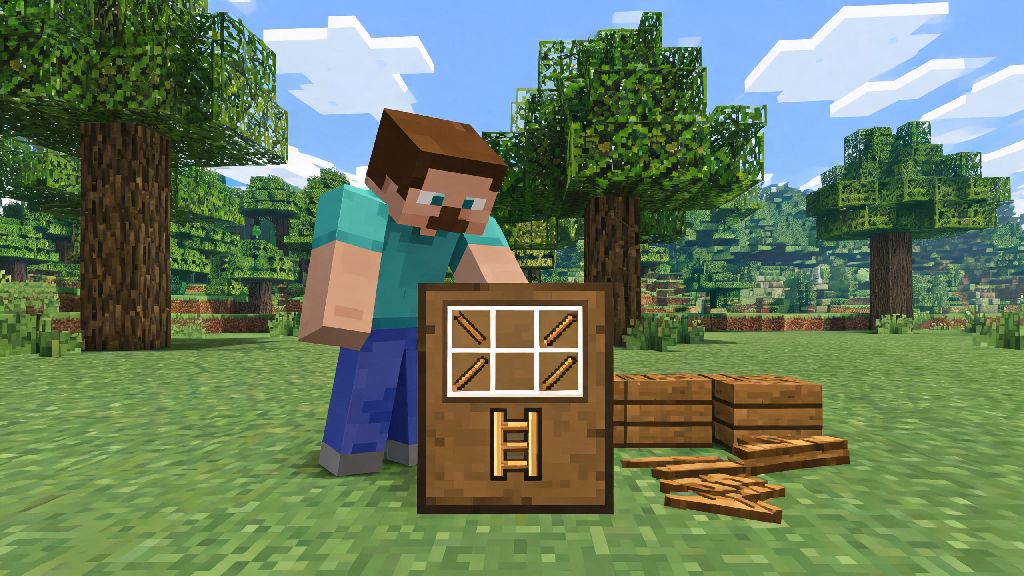
If you’ve ever found yourself stuck at the top of a 20-block cliff with no way down without taking fall damage, or struggled to reach the upper levels of your new base, you already know how essential ladders are in Minecraft. Even if you mostly play creative mode, ladders are one of the most versatile, low-cost functional items you can add to any build. Learning how to craft a ladder on Minecraft only takes a few simple steps, and once you master it, you’ll never get caught off guard by hard-to-reach spaces again. I’ve been playing Minecraft for over a decade, and I still keep a stack of ladders in my hotbar 90% of the time, whether I’m exploring a cave system or building a floating treehouse.
Materials You Need to Craft a Ladder on Minecraft
One of the best parts about ladders is that they require extremely common materials that even brand-new survival players can collect within their first 10 minutes of spawning. The only material you need for the base recipe is sticks, no rare ores or special drops required. You only need 7 sticks to craft 3 ladders per recipe, so even a single stack of wood can give you enough ladders to climb the tallest mountain in your world.
If you don’t want to craft sticks yourself, you can find them as random drops from breaking leaf blocks, looting village chests, fishing, or defeating witch mobs. But crafting sticks is always the fastest and most reliable method, especially early in a playthrough. All you need to make sticks is 2 wood planks placed vertically in your 2x2 inventory grid, which yields 4 sticks per craft. You can’t craft ladders in your personal 2x2 inventory grid, so make sure you build a crafting table first to access the 3x3 grid required for this recipe.
Step-by-Step Ladder Crafting Walkthrough
Crafting ladders is so straightforward that you’ll memorize the recipe after your first try. Start by opening your crafting table to pull up the 3x3 grid interface. First, place one stick in each slot of the far left column (top, middle, and bottom rows). Next, place one stick in each slot of the far right column, matching the left side. Finally, place one stick in the very center slot of the grid (middle row, middle column).
That’s the entire pattern, and it works for all current versions of Minecraft, including Java, Bedrock, and Pocket Edition. Once you place the sticks correctly, 3 ladders will pop up in the result slot on the right of the grid. You can move the ladders directly to your inventory or hotbar for immediate use. Ladders stack up to 64 per inventory slot, so you can carry hundreds of them at a time without taking up valuable space, which is perfect for long building projects or exploration trips.
I usually craft 2 to 3 full stacks of ladders at the start of every new survival playthrough. It saves me from having to run back to my base every time I run out halfway up a custom build or deep in a cave system. The recipe is so cheap that it’s never a waste to make extra, even if you don’t end up using all of them right away.
Pro Tips for Placing and Using Ladders in Your Worlds
Crafting ladders is only half the battle—knowing how to place and use them effectively will make your Minecraft experience way smoother. First, remember that ladders can only be placed on the side of solid, full blocks. You can’t attach them to partial blocks like slabs, stairs, or glass panes, and some special blocks like ice and honey blocks also won’t support ladders. If you’re not sure if a block will work, just test a single ladder first before you waste an entire stack.
There are tons of little-known tricks for using ladders that most new players never learn, even after years of play:
One critical warning to remember: hostile mobs like zombies and creepers can climb ladders just like players can. If you have a ladder leading up to the entrance of your survival base, you’re giving mobs a direct path inside. Always block off the top of base entrance ladders when you’re not using them to stop hostile mobs from sneaking inside. A single dirt block placed at the top of the ladder is enough to block all mobs from climbing up, and you can break it quickly when you need to use the ladder yourself.
Creative Ways to Customize Ladders for Unique Builds
Ladders aren’t just for climbing—they’re also one of the most versatile decorative items for all types of build themes. You don’t have to limit them to functional shafts and cliff paths; you can use them to add small, realistic details to almost any build without spending extra resources. For example, ladders look perfect as rungs for custom fire escapes on city apartment builds, or as support bars for scaffolding around construction sites.
You can also use ladders as window grates for medieval or industrial builds, or as railings for narrow balconies where fence posts would look too bulky. I used ladders as part of a custom prison cell build last year, and they looked way more realistic than iron bars for the cell door slots. They work great as makeshift pipe details for factory builds too, especially when paired with iron blocks and hoppers.
In creative mode, you can place ladders on almost any block to add texture without worrying about collecting materials. They’re also great for adding hidden access points to adventure maps if you’re building a map for other players to explore. Ladders work great as low-effort decorative details for industrial, medieval, or modern build themes, so don’t be afraid to experiment with different placement ideas.
Ladders are one of those underrated Minecraft items that new players often overlook, but they can make every part of your game run smoother, from exploring deep caves to building massive custom structures. Now that you know how to craft a ladder on Minecraft, you can add this simple, versatile tool to your regular crafting rotation to save time and avoid unnecessary fall damage. Next time you spawn into a new survival world, make crafting a stack of ladders one of your first priorities after you build your first pickaxe—you won’t regret it.